Live on the App Store in Korea · v1.0 한국 App Store 출시 · v1.0
Your mock exam. Every minute, accounted for. 내 실모, 1분도 놓치지 않고.
Bring the PDF mock exams you own to iPad and take them like the real thing with Apple Pencil. When you finish, see how long you stayed on each question, the order you solved them in, and the ones you came back to.
가진 실모 PDF를 iPad로 가져와 Apple Pencil로 실제 시험처럼 풉니다. 시험이 끝나면 문항마다 머문 시간, 푼 순서, 다시 본 문항을 보여 줍니다.


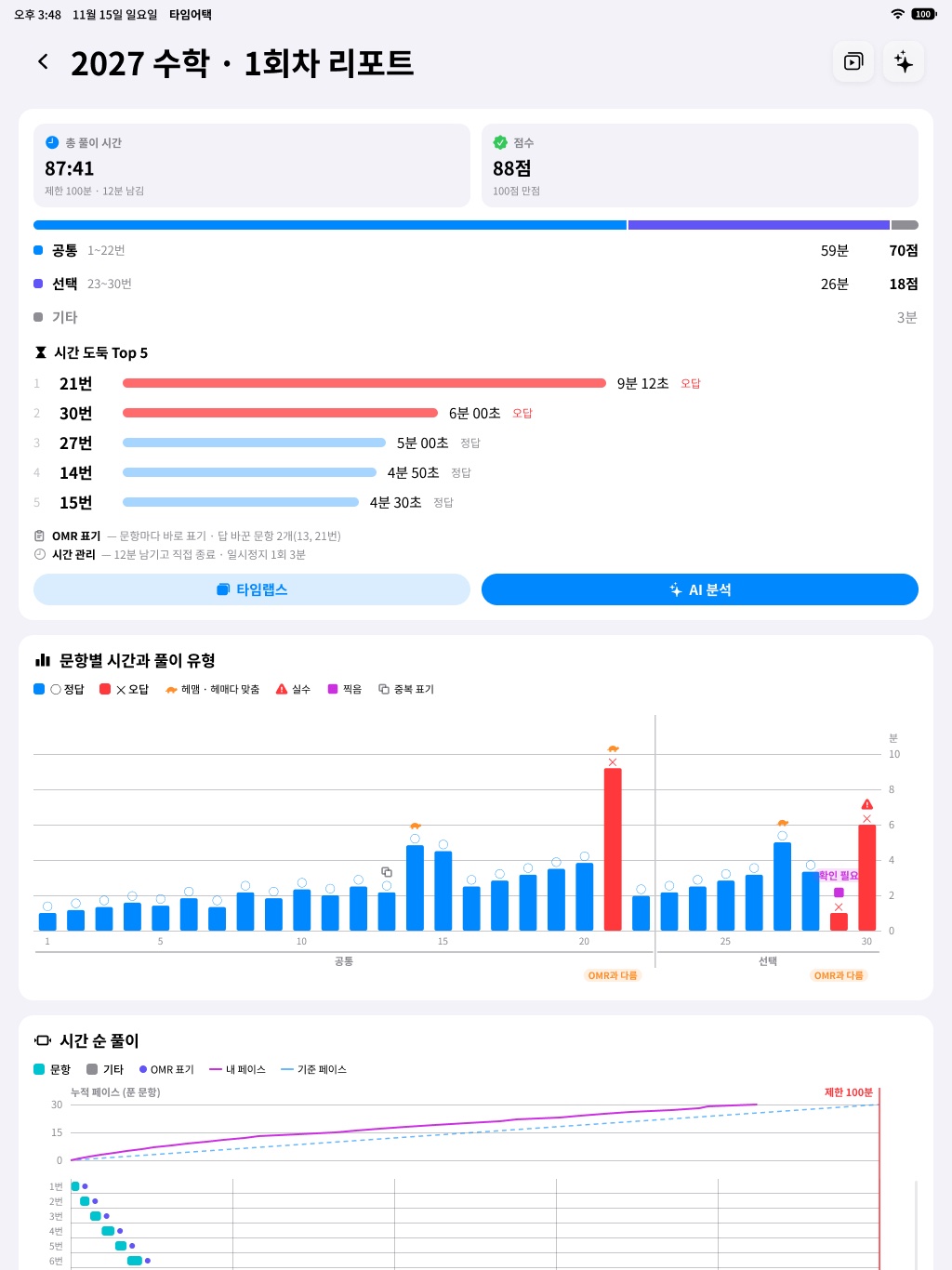
Time report시간 리포트
Not just your score. Where the 100 minutes went. 점수 너머, 100분이 어디로 갔는지.
During the exam there is no AI on screen: just your PDF, four pen tools, an OMR sheet at the side, and a timer with 10- and 5-minute alerts. The report is worked out on your iPad.
시험 중에는 AI가 나오지 않습니다. 내 PDF, 필기 도구 4종, 옆 OMR, 10분·5분 전 알림 타이머만 둡니다. 리포트는 iPad 안에서 계산합니다.
-
Time per question and solve type문항별 체류 시간과 풀이 유형
How long you stayed on each question, and a solve type such as struggled-then-correct, careless mistake, or guess. Time for questions solved without writing is estimated and shown with an evidence grade.
문항마다 머문 시간과 풀이 유형(헤매다 맞춤, 실수, 찍음 등). 필기 없이 푼 문항의 시간은 추정하며 근거 등급과 함께 표시합니다.
-
Pacing curve페이스 곡선
How your marked answers built up over time, next to a reference pace.
시간에 따라 표기한 문항 수가 어떻게 늘었는지 기준 페이스와 함께 봅니다.
-
Free grading, a report for each subject무료 채점, 과목별 리포트
Add an answer key or an explanation PDF and grading is free.
정답표나 해설을 넣으면 무료로 채점합니다.
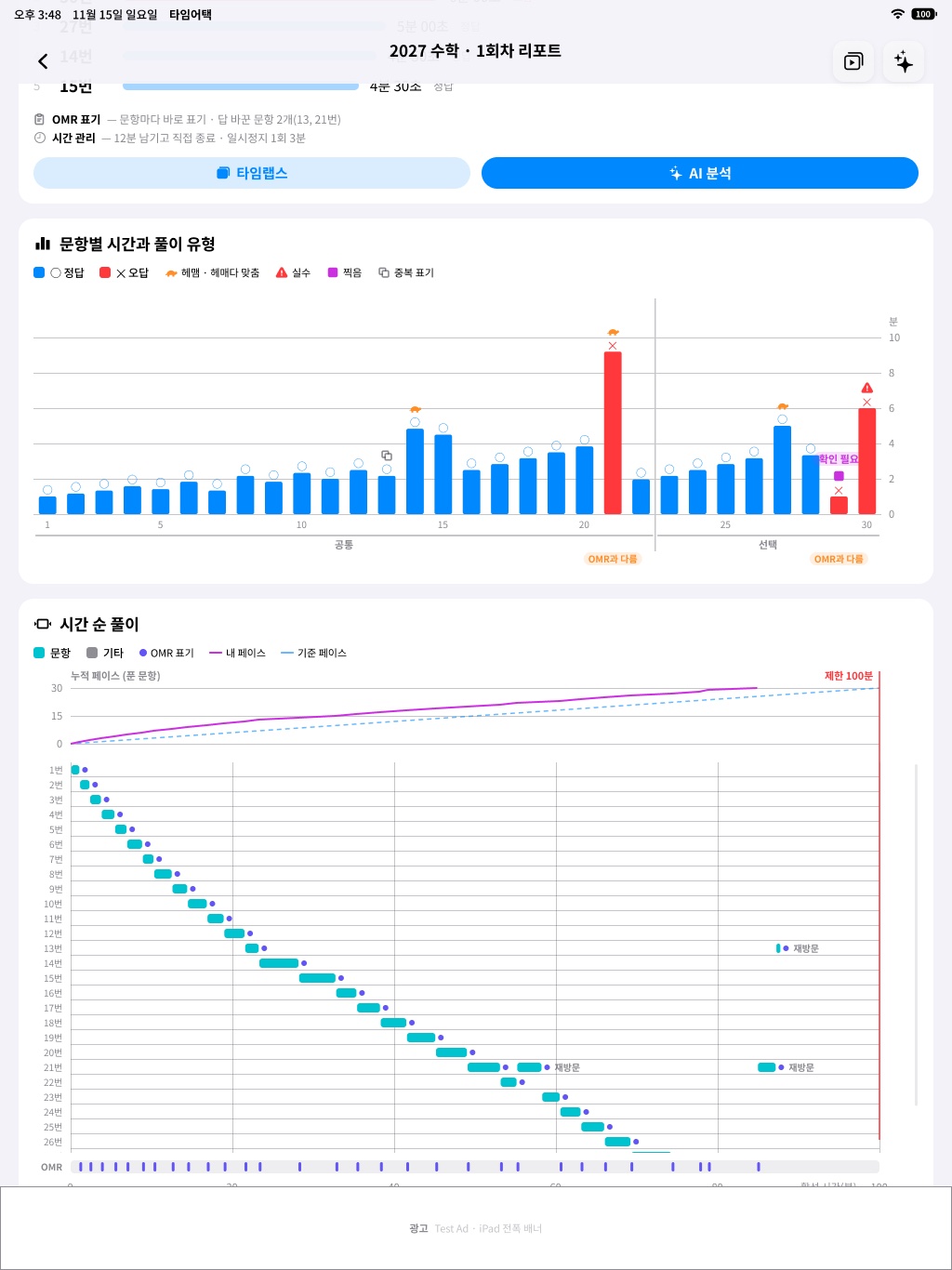
Timeline and timelapse타임라인과 타임랩스
Replay the exam in the order you took it. 푼 순서 그대로, 시험을 다시.
Each pen stroke is saved on your iPad with the time you wrote it, so the app can put your exam back together in order.
획마다 쓴 시각을 iPad에 남겨, 시험을 푼 순서대로 다시 맞춰 봅니다.
-
Time sinks Top 5시간 도둑 Top 5
The five questions that took the most time, with visit counts and their share of the total.
시간을 가장 많이 쓴 다섯 문항을 방문 횟수, 전체 대비 비율과 함께.
-
Solve order and revisits풀이 순서와 재방문
Which question you were on and when, the order you first reached each one, and the ones you came back to.
언제 어느 문항에 있었는지, 처음 손댄 순서, 다시 본 문항.
-
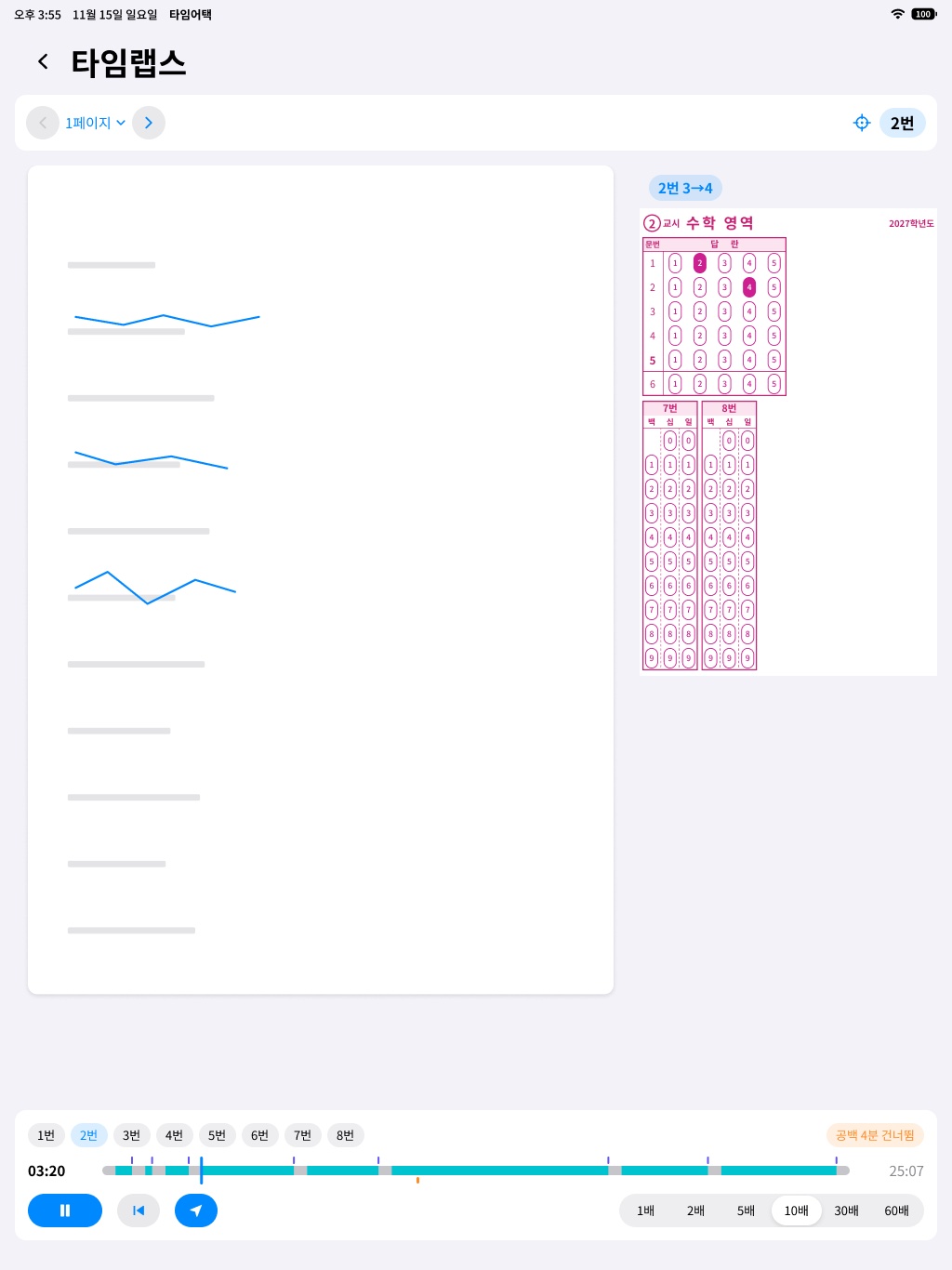
Handwriting timelapse필기 타임랩스
Replay every stroke in the order you wrote it, at 10x, 30x, or 60x.
쓴 순서대로 필기를 10배·30배·60배속으로 다시 재생합니다.
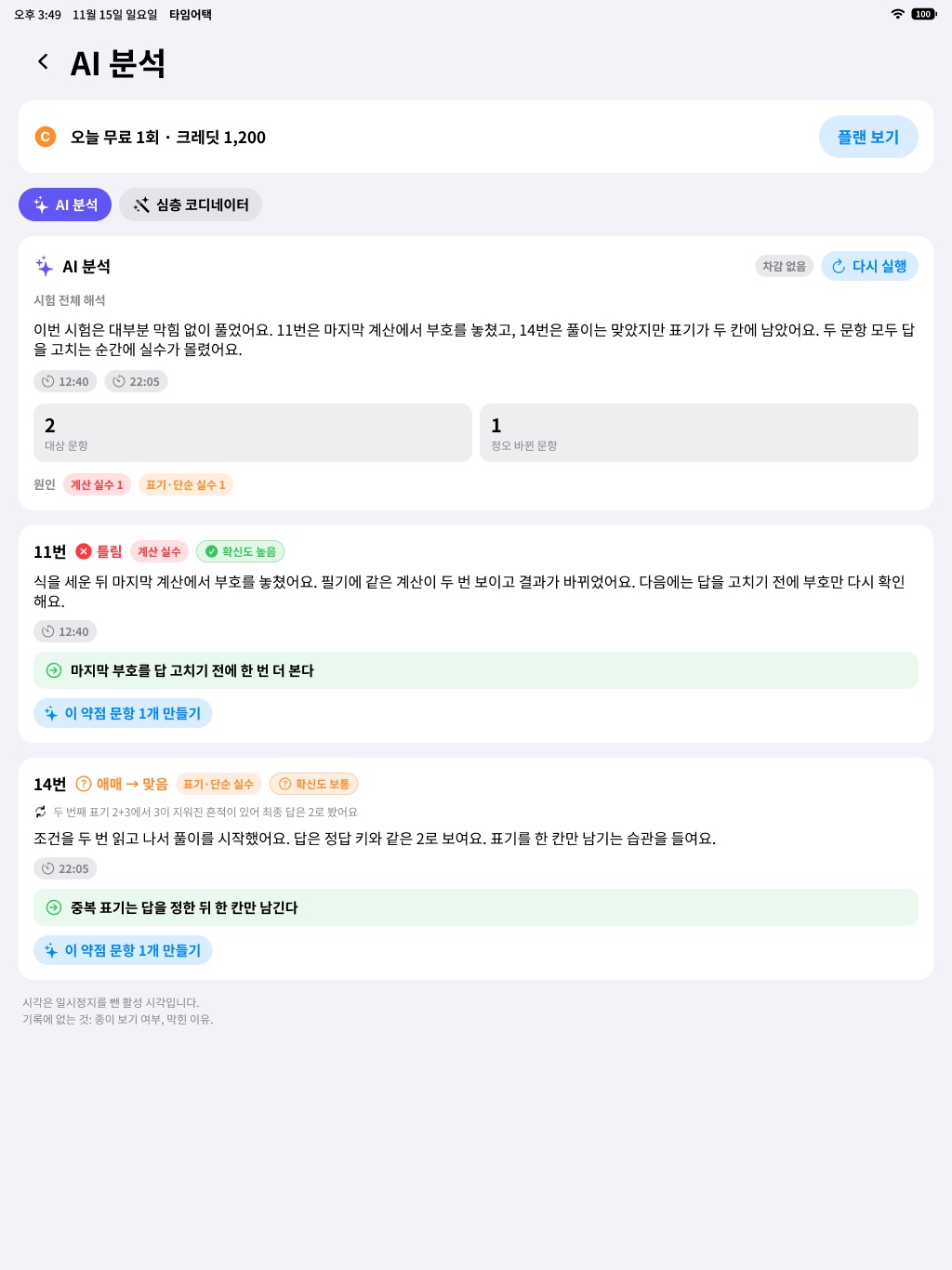
AI Analysis (AI 분석)AI 분석
Why you missed it, and one habit for next time. 틀린 이유, 그리고 다음 시험의 한 줄.
Only if you agree, after the exam, AI Analysis looks at the questions you missed or were unsure about on exams with an answer key. The report and on-device analysis are free and send nothing to a server.
동의한 경우에만, 시험이 끝난 뒤 정답 키가 있는 실모에서 틀리거나 애매한 문항을 살펴봅니다. 리포트와 기기 안 분석은 무료이며 서버로 아무것도 보내지 않습니다.
-
Right or wrong, and the likely cause정오와 원인
A concept gap, a calculation slip, misreading the passage or conditions, choice judgment, or time pressure, read together with your time signals such as answers you changed.
개념 부족, 계산 실수, 지문·조건 독해, 선지 판단, 시간 부족 같은 원인을 답을 고친 문항 같은 시간 신호와 함께 짚습니다.
-
Answer-key check정답 키 확인 안내
If the AI disagrees with the answer key, it doesn’t assign a cause and asks you to check the explanation yourself.
AI 판단이 정답 키와 다르면 원인을 정하지 않고 해설로 직접 확인하라고 안내합니다.
-
One action for the next exam다음 시험 행동 한 줄
A single line on what to do differently next time.
다음 시험에서 다르게 할 행동 한 줄.
-
Make one weakness question약점 문항 1개 만들기
One practice question like the one you missed, labeled “AI-generated”. Uses credits.
틀린 문항과 비슷한 연습 문항 1개. ‘AI 생성’ 표시가 붙고 크레딧을 씁니다.
-
AI Deep Coordinator (AI 심층 코디네이터)AI 심층 코디네이터
The most detailed option. It looks at the whole exam and is available with credits only.
시험 전체를 살펴보는 가장 자세한 분석. 크레딧으로만 쓸 수 있습니다.
AI results are labeled “AI-generated” and can be wrong. Check them against the explanation and your own materials.
AI 결과에는 ‘AI 생성’ 표시가 붙으며 틀릴 수 있습니다. 해설과 원래 자료로 함께 확인해 주세요.
What is sent to AI, and whenAI로 무엇을, 언제 보내나요
Only when you agree and start an AI feature, TimeAttack sends the following to Anthropic Claude (USA) through our server. Raw stroke coordinates, scroll history, and raw pen-hover data are never sent.
이용자가 동의하고 AI 기능을 실행한 경우에만, 운영자 서버를 거쳐 Anthropic Claude(미국)로 다음을 보냅니다. 필기 좌표 원본, 화면 이동 기록, 펜 호버 원시값은 보내지 않습니다.
- AI Analysis
- Question-area images (the exam and your handwriting, cropped) for questions you missed or were unsure about; per-question signals for every question (time spent and target time, first and last writing times, erases, answer changes and when, visits, evidence grade, solve type), with the answer key and your marked answers; and explanation excerpts for missed questions (up to 280 characters each).
- AI Deep Coordinator
- The same signals and excerpts, plus exam page images. The name and exam-number fields on the first page are masked before sending, but masking may not be perfect. Handwriting crops are sent only if you check that option.
- Make one weakness question
- That question’s details and signals, and an explanation summary (up to 400 characters).
- Reading an answer key with AI
- The explanation PDF you add. It is deleted from our server as soon as extraction ends.
- AI 분석
- 틀리거나 애매한 문항의 영역 이미지(시험지와 필기를 잘라낸 이미지), 전 문항의 기록 신호(체류 시간과 목표 시간, 필기 첫·마지막 시각, 지움 수, 답 표기 변경 횟수와 시각, 방문 횟수, 근거 등급, 풀이 유형)와 정답 키·표기한 답, 틀린 문항의 해설 발췌(문항당 280자 이내)
- AI 심층 코디네이터
- 위와 같은 기록 신호와 해설 발췌, 시험지 쪽 이미지. 첫 쪽의 이름·수험번호 칸은 보내기 전에 가리지만 완벽하지 않을 수 있습니다. 필기 크롭 이미지는 따로 체크한 경우에만 보냅니다.
- 약점 문항 1개 만들기
- 그 문항의 정보와 기록 신호, 해설 요약(400자 이내)
- AI로 정답표 읽기
- 이용자가 올린 해설 PDF. 추출이 끝나면 서버에서 바로 지웁니다.
Exam and question images are not stored on our server, and AI result text is deleted after 30 days. Anthropic deletes inputs and outputs within 30 days; if flagged for a policy violation they may be kept for up to 2 years, and trust and safety classification scores for up to 7 years. We do not use your handwriting or exam images to train AI models.
You can withdraw consent in the app’s Settings. Details: Privacy Policy §5-4 (Korean).
시험지·문항 이미지는 운영자 서버에 저장하지 않으며, AI 결과 글은 30일 뒤 지웁니다. Anthropic은 입력과 출력을 30일 이내에 삭제합니다. 정책 위반 플래그가 지정되면 최대 2년, 신뢰와 안전 분류 점수는 최대 7년 동안 보관될 수 있습니다. 필기나 시험지 이미지를 AI 모델 학습에 쓰지 않습니다.
동의는 앱 설정에서 철회할 수 있습니다. 자세한 내용은 개인정보 처리방침 5-4항을 봐 주세요.
How it works작동 방식
Your iPad does the work. 대부분의 일은 iPad에서.
Exams, handwriting, and reports stay on your iPad and leave it only for the AI features you agree to. The server handles anonymous sign-in, purchases and credits, and the AI jobs you start.
시험지, 필기, 리포트는 iPad에 저장되며 동의한 AI 기능을 쓸 때만 밖으로 나갑니다. 서버는 익명 로그인, 결제와 크레딧, 이용자가 실행한 AI 작업을 맡습니다.
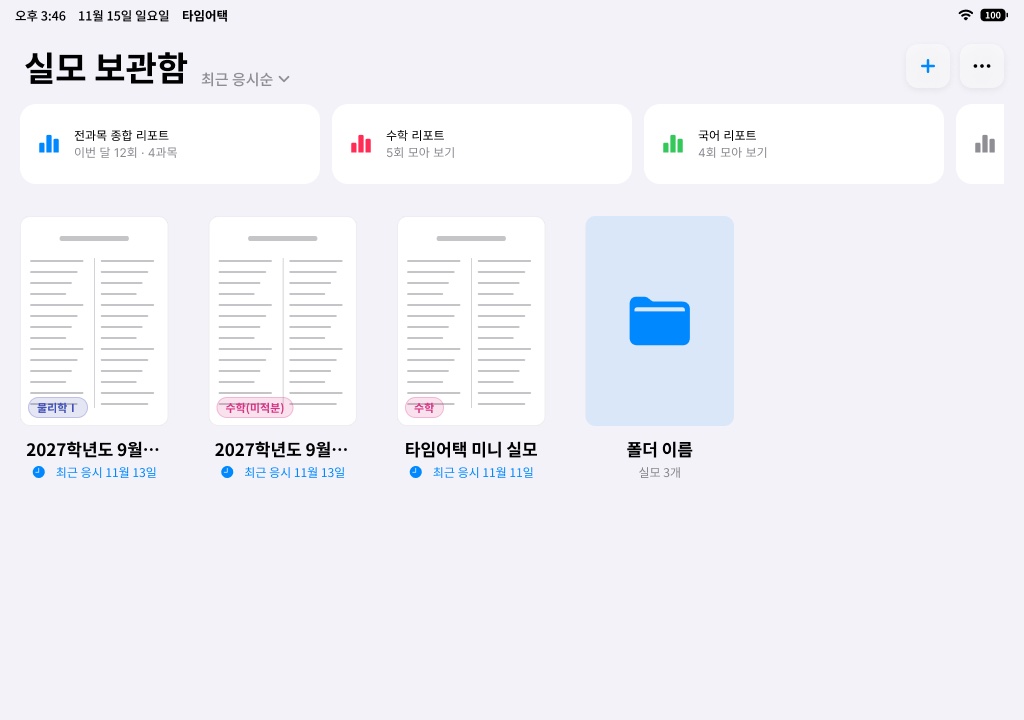
On your iPadiPad 안에서
- PDF viewer, Apple Pencil pen tools, OMR sheetPDF 보기, Apple Pencil 필기 도구, OMR 답안지Native iPad appiPad 전용 앱
- Finding where each question is문항 위치 인식PDFKit text layer first, Apple’s Vision framework as a fallbackPDFKit 글자 층 먼저, 부족하면 Vision으로 보충
- Reading answer keys정답표 읽기On the iPad first; with your consent, AI reads what it can’t기기에서 먼저, 못 읽은 문항은 동의 뒤 AI가
- Handwriting and per-stroke timestamps필기와 획별 시각Saved on iPadiPad에 저장
- Grading, time report, on-device analysis채점, 시간 리포트, 기기 안 분석On-device기기 안
Server and AI서버와 AI
- Anonymous sign-in, purchases and credits, AI jobs익명 로그인, 결제·크레딧, AI 작업Supabase · AWS Seoul (ap-northeast-2)
- AI Analysis and AI Deep Coordinator, from Supabase Edge FunctionsAI 분석·AI 심층 코디네이터(Supabase 엣지 함수에서 호출)Anthropic Claude API (direct)Anthropic Claude API(직접 호출)
- Subscriptions and credit packs구독과 크레딧 팩Apple in-app purchaseApple 인앱 결제
- Ads for free users (non-personalized)무료 이용자 광고(비개인화)Google AdMob
Planned계획
- Calling Claude through AWS Bedrock. Not in use today; if we move, the Privacy Policy and in-app consent will be updated first.AWS Bedrock을 거쳐 Claude를 호출하는 안. 지금은 쓰지 않으며, 옮기게 되면 처리방침과 앱 안 동의를 먼저 바꿉니다.AWS Bedrock
About the app앱 정보
- App name앱 이름타임어택: 실모 훈련하기
- Bundle ID번들 IDkr.timeattack.app
- Status상태Live on the App Store (Korea) · v1.0App Store 출시(한국) · v1.0
- Requires지원 기기iPad · iPadOS 18 or lateriPad · iPadOS 18 이상
Coming next준비 중
What we’re working on. 지금 만들고 있는 것.
Not in v1.0 yet. There are no release dates, and plans can change.
v1.0에는 아직 없습니다. 출시 날짜는 정하지 않았으며, 계획은 바뀔 수 있습니다.
TimeAttack Labs (타임어택랩스)
We build TimeAttack, an iPad app for mock-exam practice, in Seoul, Korea. TimeAttack Labs is a sole proprietorship (개인사업자) owned by Jiseok Han. On the App Store the app is listed under the developer name ‘JISEOK HAN’.
서울에서 iPad 실전 모의고사 앱 타임어택을 만듭니다. 타임어택랩스는 한지석이 운영하는 개인사업자이며, App Store에는 개발자 이름 ‘JISEOK HAN’으로 표시됩니다.
- Owner대표
- Jiseok Han (한지석)한지석
- Contact문의
- contact@timeattacklabs.app
- Business registration no.사업자등록번호
- 622-08-79792
- Mail-order business report (통신판매업 신고)통신판매업 신고
- 제2026-서울금천-2366호
- Address주소
- 201, 30-7 Doksan-ro 88-gil, Geumcheon-gu, Seoul, Republic of Korea서울특별시 금천구 독산로88길 30-7, 201호 (독산동)
- Privacy requests개인정보 요청
- For access, deletion, or consent withdrawal, use the contact in Privacy Policy §14 (Korean).열람·삭제·동의 철회 요청은 개인정보 처리방침 14항의 연락처로 보내 주세요.
The legal and support pages are in Korean.
법률 고지와 지원 페이지는 한국어로 되어 있습니다.